Office Tasks Tracker: Streamline Your Daily Workflow
Many professionals start the day with a full cup of coffee and a head full of scattered tasks. Emails to send, calls to return, meetings to attend, and quick reminders that disappear without a trace by noon. An Office Tasks Tracker Printable Template turns that mental list into a tangible, structured plan. Instead of juggling sticky notes and notification pings, you get a single page that maps out the hours, priorities, and follow‑ups in one glance. It doesn’t promise magical productivity; it simply gives your brain permission to stop holding everything at once.
What the Office Tasks Tracker Printable Template Covers
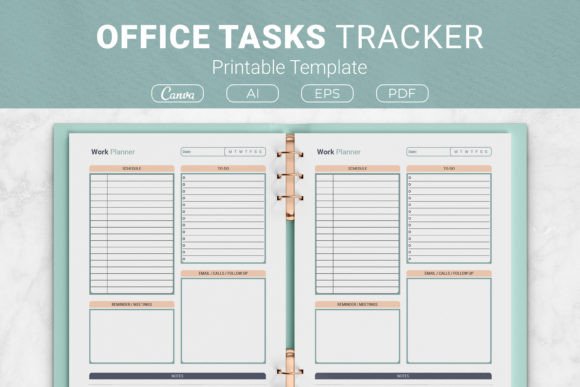
Every well‑designed tracking sheet starts with the basics that feel obvious until you don’t have them. This template weaves together a daily schedule block, a to‑do list, a dedicated email and calls follow‑up section, a reminders and meetings spot, and open notes. The schedule section helps you block time realistically, not just fill every slot with ambition. The to‑do list sits right next to it so you can see whether today’s tasks actually fit into the hours you have. The follow‑up area keeps contact‑related action items from slipping through cracks—a common pain point for client‑facing roles. Meetings and reminders sit in their own visual corner, making sure you don’t double‑book or forget a prep session. Finally, the notes section collects those random thoughts, questions, and sparks that don’t belong anywhere else but matter down the road.
How a Tangible Planner Reduces Mental Clutter
When you write something down, your brain releases the tension of trying to remember it. This is not just folk wisdom; it’s the reason so many people find peace in a physical planner. The Office Tasks Tracker printable acts as an external memory drive. Instead of replaying the same list in your head while commuting or sitting in a meeting, you can glance at the sheet and instantly know what’s next. The act of checking a box also delivers a small but real sense of progress that digital apps often mask with endless scrolling. And because it’s paper, there’s no notification buzzing on top of your to‑do list. You choose when to look at it, which cuts reactive switching.
Adapting the Tracker to Your Professional Style
One template doesn’t fit all, but the beauty of a well‑structured printable is that you shape it to your rhythm. A marketing manager might use the notes section to jot down campaign ideas that surface during the day, while using the follow‑up box to track client calls. A freelancer juggling multiple projects may fill the schedule block with deep‑work windows and use the to‑do list for submissions and invoicing. An educator can plan lesson prep periods and note parent calls that need returning. Even a Kindle Direct Publishing creator can fill the same tracker to manage manuscript edits, cover design check‑ins, and launch deadlines. The layout doesn’t dictate your profession; it simply holds the pieces you need to see at a glance.
The Power of Multiple File Formats for Customization
Not everyone wants to print straight from a ready‑made PDF. That’s why the package includes an AI Illustrator file, an EPS version, and a link to an editable Canva template alongside the print‑ready PDF. If you’re comfortable with design tools, you can adjust fonts, swap colors, or even add your company logo before hitting print. The Canva link opens the door for those who don’t own professional software; you can drag and drop elements, change headings, or tweak the layout to match your branding, all within a browser. For everyone else, the PDF works immediately—no editing required. This range means you’re never locked into a static design, which matters when your workflow changes or you want a fresh look each month.
Sizing Options for Every Physical Setup
The tracker comes in four common sizes: US Letter (8.5 x 11 inches), A4 (210 x 297 mm), 7.5 x 9.25 inches, and 6 x 9 inches. US Letter and A4 slip perfectly into standard three‑ring binders or disc‑bound systems, making them ideal for a desktop reference. The half‑letter size (7.5 x 9.25) fits smaller planners and is easy to carry in a bag without folding. The compact 6 x 9 inch version works well for a personal planner or as an insert in a traveler’s notebook. These size choices aren’t just about aesthetics; they influence how you interact with the tracker. A larger sheet gives more writing room for detailed notes, while a smaller one encourages concise, high‑priority thinking.
Using the Template for Kindle Direct Publishing Projects
For those exploring the low‑content book market on Amazon, the Office Tasks Tracker Printable Template doubles as a ready‑made interior for planners. Since the package includes open‑source AI and EPS files, you can adjust margins, add bleed, and ensure every element meets KDP specifications. The PDF files are already print‑ready, which speeds up the formatting process significantly. Instead of building a daily task planner from scratch, you can customize the template, upload the interior to KDP, and offer a professional product to customers who crave simple organization tools. Many successful low‑content publishers use trackers like this because they solve a universal problem without requiring complex design work. Just remember to check Amazon’s guidelines on copyright when using source files; the open‑source nature here gives you flexibility to modify and claim authorship on the final design.
Building a Personalized Office Binder System
Printing one sheet is helpful. Printing several and pairing them with other printables creates a system. Start with a sturdy binder and a set of dividers. Print a stack of the tracker in your chosen size, punch holes if needed, and place it at the front of a monthly section. Behind it, you might add project planning sheets, meeting note pages, and a quarterly goals tracker. Because the Office Tasks Tracker covers daily operations, it acts as the hub; everything else feeds into it. At the end of the week, filed sheets become a record of accomplishments and a reference for billing or performance reviews. This analog approach also works well for people who want to separate work from personal devices, keeping professional planning off their phone and in a physical space they control.
When a Printable Tracker Works Best – and When It Might Not
Paper planners shine for individuals who think best with a pen in hand, who want to disconnect from screens periodically, or who need a single, interruption‑free view of their day. They also work wonderfully in home office settings where you can leave the binder open on your desk all day. However, if you work in a highly collaborative, fast‑moving digital environment where tasks are assigned and updated in real‑time by teammates, a printable might need a digital companion. You could photograph the sheet to share with a colleague, but a fully remote team might still rely on project management software. Likewise, if you lose papers easily or travel frequently with minimal luggage, a smartphone app may be more practical. Think of the tracker not as a replacement for all tools, but as a focused layer that sits right where handwriting and physical visibility matter most.
Making the Most of the Follow‑Up and Notes Sections
The section that often goes underused in any planner is the dedicated follow‑up space. Yet for anyone who deals with clients, partners, or internal requests, it’s a lifesaver. Instead of burying “call Mark back” in a long to‑do list, you place it in the email and calls follow‑up area where it stands out. The same goes for the notes section. Treat it not as scratch paper but as a mini journal for the day: record a decision made during a quick conversation, jot a URL someone mentioned, or sketch a quick diagram. Weeks later, these notes can explain why you made a certain choice, which is valuable context that time erodes. Pair the notes with the schedule, and you create a small daily narrative that improves long‑term project memory.
Getting Started Without Overcomplicating Things
You don’t need to overhaul your entire approach on a Monday morning. Start by downloading the PDF that matches your printer’s paper size. Print one sheet on Friday afternoon for the coming Monday. Spend five minutes filling in the schedule blocks with non‑negotiable appointments first, then add two or three high‑priority tasks to the to‑do list. Use the reminders area for anything time‑sensitive that doesn’t need a full‑hour slot. Leave the notes section blank until the day unfolds; it will fill naturally. After a few days of using the Office Tasks Tracker Printable Template, you’ll notice which sections you rely on most and can adjust the customization options—editing the Canva design or printing at a different size—to match that pattern. The goal is not a perfect sheet but a clear head and a reliable system that grows with you.
Productivity doesn’t always need complicated frameworks or subscriptions. Sometimes it wears the quiet form of a printed page that holds your scattered thoughts, invites you to write them down, and reminds you that even a busy day has enough room when you see it laid out clearly. An office tasks tracker doesn’t do the work for you, but it makes sure you know exactly what work needs doing next.