How Halloween Maze Activities KDP Interior Simplifies Your Spooky Season Book Creation
Building a children's activity book around Halloween means juggling multiple content types, tight seasonal deadlines, and the need for print-ready precision. The Halloween Maze Activities KDP Interior package steps into this workflow as a focused, ready-to-assemble resource: 20 maze designs with varied geometric path styles, sized for two distinct age bands. It is not a standalone book but a core module you slide into a larger project — placed right alongside coloring pages, word search grids, or dot-to-dot challenges. Understanding where this interior fits, how to prepare it, and how it interacts with other assets turns a loose idea into a publishable product without rework or last-minute scrambling.
What Exactly Does This Maze Package Include and How Is It Structured?
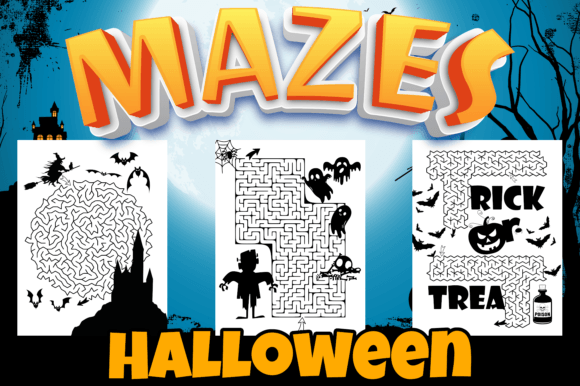
The product is a ZIP archive containing 20 individual PNG files, each a high-resolution maze interior page. Every maze is designed with print-ready specifications, so you avoid upscaling artifacts or margin headaches. The path styles go far beyond the basic square-grid labyrinth, giving you visual variety without extra design effort. Specifically, the mazes use these pathway geometries:
- Square
- Hexagon
- Triangle
- Cube (three-dimensional perspective)
- Polygon
- Octadiamond
This structural diversity means the same activity book can hold a child's attention longer, because each page presents a new spatial challenge. It also helps you position the book for a wider age spread. The package supports two age ranges: 4–6 years old and 6–8 years old. A maze with a simple square grid fits the younger group, while polygon or cube mazes challenge the older children. When you plan your book's internal progression, you can layer these by difficulty, starting with the simpler paths and gradually introducing the complex ones. The PNG format keeps backgrounds transparent or white depending on how you set them, so placing them onto your page layouts becomes a drag-and-drop action in almost any publishing software.
Where Halloween Maze Activities KDP Interior Fits in a Broader Activity Book Workflow
Think of a seasonal children's book as a puzzle you assemble from reusable pieces. You might have a coloring section, a word search section, a few "spot the difference" images, and then the maze cluster. The maze package functions as that ready-made cluster. Instead of designing mazes from scratch — calculating path widths, testing print clarity, checking solution paths — you pull pre-built files into your master document and sequence them.
In a typical workflow, you start with a project outline: total page count, age targeting, mix of activities. After deciding on the section order, you source or create each activity type. The Halloween Maze Activities KDP Interior plugs in at the sourcing stage. You might pair it with a Halloween coloring book interior purchased elsewhere, or layer it with a word search activity book you've already formatted. The key advantage is that this package arrives as individual PNGs, not a locked PDF. That means you can insert them between other pages, duplicate them if you want mirror layouts, or even resize them slightly to fit a consistent trim size across your entire book — though you should watch resolution scaling limits.
After placement, you add a book title page, a "This Book Belongs To" page, and any instructional text for children. Because the mazes don't carry watermarks or intrusive branding, they blend seamlessly into your overall design. You keep full creative control over the wrapper — the cover design, the intro pages, the transitional pages between sections — while the activity core stays professionally consistent.
Using Mazes Alongside Other Activity Types Without Disrupting Flow
Parents buying a Halloween activity book expect variety. A book of only mazes works, but the broader market often responds better to mixed-format books. Here's how a typical integration might look:
- Pages 1–5: Simple coloring items (pumpkins, ghosts, bats)
- Pages 6–12: The square and triangle mazes from this package, aimed at the 4–6 age group
- Pages 13–20: Halloween word search puzzles
- Pages 21–30: Complex mazes (hexagon, cube, polygon, octadiamond) suited to 6–8 years
- Pages 31–35: More detailed coloring scenes
- Pages 36–40: Dot-to-dot or "find the shadow" games
This ordering creates a rhythm: calm coloring, then focused maze work, then vocabulary-based searching, then a tougher maze set that feels like a reward for earlier effort. The maze package makes the dual-age approach feasible because you get enough path variety to serve two difficulty levels without buying separate resources. When you batch-export your final PDF for KDP, the consistent high resolution of the PNGs prevents that one "blurry page" complaint that often comes from mixing assets of uneven quality.
Preparing the Files for a KDP-Ready Interior
Having 20 print-ready PNGs is a strong start, but the transition from a folder of images to a flawless print-ready PDF involves a few careful steps. First, confirm your trim size. Most children's activity books on KDP land around 8.5 x 11 inches, but 8 x 10 and 7 x 10 also appear. Resize the PNGs to match your chosen dimensions using a tool that maintains resolution, such as Affinity Publisher, Adobe InDesign, or even Canva with the correct page settings. Place each maze centered on its own page, leaving adequate gutter margin. KDP requires a minimum margin of 0.375 inches on all sides, but for a product handled by children, 0.5 inches or more is safer — small hands often press books flat, causing content near the spine to disappear.
Next, consider whether to include solutions. Some maze books place answer keys at the back. You can easily create solution pages by duplicating each maze image, then drawing the correct path using a red dotted line in an image editor, or simply adding a small thumbnail of the solved maze. This step adds practical value without much time because the mazes are already in a clean digital format. Group the solutions separately so they don't interfere with the main activity flow.
Color mode matters. KDP prints black-and-white interiors by default, though color printing is available at a higher cost. Since these maze files are likely grayscale or black line art, confirm they are set to grayscale color space in your image editor before embedding them into your layout. This prevents any unexpected color casts or ink density issues. Export your final PDF with standards like PDF/X-1a to lock in fonts and flatten transparency, though simple maze books rarely have those complications.
Optimizing for Two Age Groups Simultaneously
The package's age span is a practical business lever. Listing a book for ages 4–8 automatically taps into search filters on Amazon, but you must deliver on that promise inside the pages. A common pitfall is making the first half too easy and the second half too hard, causing frustration for either end of the age range. A smoother method is to interleave difficulty levels subtly. For example, place a simple square maze opposite a coloring element, and a cube maze opposite a word search clue. This doesn't segregate children by age; it lets families with siblings use different pages at the same time. One child works the easier left page while an older sibling tackles the right page. The variety of path types — from the straightforward square to the more abstract octadiamond — supports this natural mixed-use scenario.
Organizing Your Project Assets for Reuse Across Multiple Books
If you plan to create a series — a Halloween edition, a Christmas edition, an animal-themed edition — treat each asset package as a modular component. Create a master folder structure on your local drive or cloud storage:
- /KDP Assets/
- /Mazes/ — contains subfolders for holidays, difficulty levels, styles
- /Coloring/ — line art organized by theme
- /Word Searches/ — editable puzzle grids
- /Covers/ — template PSD or Canva files
Drop the Halloween Maze Activities KDP Interior PNGs into /Mazes/Halloween/. Later, when you build a space-themed book, you might commission or purchase a similar maze pack with circle and spiral paths, but the workflow remains identical: drag from the folder, place on the page, adjust margins. This asset-based thinking cuts each subsequent project's design time significantly. You reuse your layout template, your cover design process, and your preflight checklist, only swapping the content files.
Quality Control and Print Testing Without Ordering Proofs Every Time
Before publishing, simulate how a 4-year-old or an 8-year-old interacts with the maze. Print two or three representative pages at home: one square maze, one polygon maze, and one cube maze. Hand them to a child within the appropriate age range, or simply observe if the path lines are thick enough for extra-fine motor skills. If the lines feel too thin, you can add a slight stroke weight in an image editor, but starting with high-resolution print-ready graphics usually avoids this. Check that the maze walls are clearly distinct from the path — especially in the polygon and octadiamond styles, where multiple intersecting lines could create visual confusion. A quick overlay scan on screen at 200% zoom reveals any crowding.
Also verify that the file names are sorted alphabetically in the order you want them to appear in the book. Renaming them to "Maze_01_Square.png", "Maze_02_Hexagon.png" and so on keeps your document assembly linear. Any mismatch between file sequence and intended page sequence creates layout errors that are tedious to fix after the fact.
Long-Term Use Beyond a Single Halloween Release
Seasonal books have a limited sales window, but the underlying maze assets don't expire. Once Halloween passes, you can modify the book's theme by overlaying different decorative elements around the same maze structures. If the maze lines are generic enough — which geometric path types tend to be — you might add Christmas icons at the start and end points, repackage the interior as a "Winter Wonderland Mazes" book, and publish it for the holiday season. The core activity stays the same; only the context changes. This adaptability multiplies your return on the initial resource purchase.
You can also extract individual mazes to use as bonus content within larger activity bundles, lead magnets for email list building, or printable downloads on a personal blog. The 20-maze set works as a cohesive unit, but because the files are individual PNGs, you aren't forced to deploy all of them at once. That flexibility matters when you're testing different product configurations on KDP to see which combination of activities converts best.
Common Integration Mistakes That Slow Down Your Workflow
A few avoidable errors surface when creators first blend pre-made interiors with their own pages. One is inconsistent page numbering. When you insert the mazes into a document that already has other activities with different files, the page count shifts. Always apply page numbers through your layout software's automatic numbering feature, not by hand-typing numbers onto the images, or you'll waste time renumbering if you move pages later.
Another mistake is ignoring bleed settings. Maze books with content that runs close to the edge need no bleed if you follow the margin guidelines, but if you mistakenly add a full-page decorative border to the maze page background, that border must bleed. The PNG interiors themselves likely don't require bleed, but your additional background treatments might. Keep layers separated in your layout file: maze on one layer, any decorative frames on another. This separation lets you export a clean interior PDF while preserving your creative options.
Finally, don't inflate the page count by stretching a few mazes across many pages with large filler spaces. A 20-maze set gives you 20 activity pages. You can add a blank back to each maze page for drawing space, but children's book buyers quickly notice if content feels sparse. Use the mazes as one substantial component within a denser activity book, not as the entire book unless you also add connecting activities, facts, or mini-stories that build a richer experience.
Making the Most of the ZIP File Architecture for Team or Client Work
If you collaborate with a cover designer, an editor, or a virtual assistant who handles KDP uploads, the ZIP folder becomes a shared point of truth. You can upload the unzipped PNGs to a shared Google Drive or Dropbox folder, clearly naming the folder "Halloween Maze Interiors — final assets." Instruct team members to pull from that source rather than emailing attachments back and forth. This prevents version conflicts and ensures everyone uses the same high-resolution originals. When the project is complete, archive the ZIP alongside the final PDF and cover file so you have a complete snapshot of the book's production assets. Six months later, when you want to repurpose the mazes, you won't waste time hunting through disorganized folders.
For those managing multiple KDP niches, treat this maze package as a benchmark for evaluating future interior purchases. Note what worked: the variety of path types, the clear age segmentation, the individual file format, the absence of tied-in branding. When you assess another activity interior — say, a math puzzle pack or a handwriting practice book — you'll know to check for those same quality markers before buying. This informed sourcing keeps your product quality consistent and your production pipeline moving without unexpected compatibility stops.